Easily build your own network with Tailscale
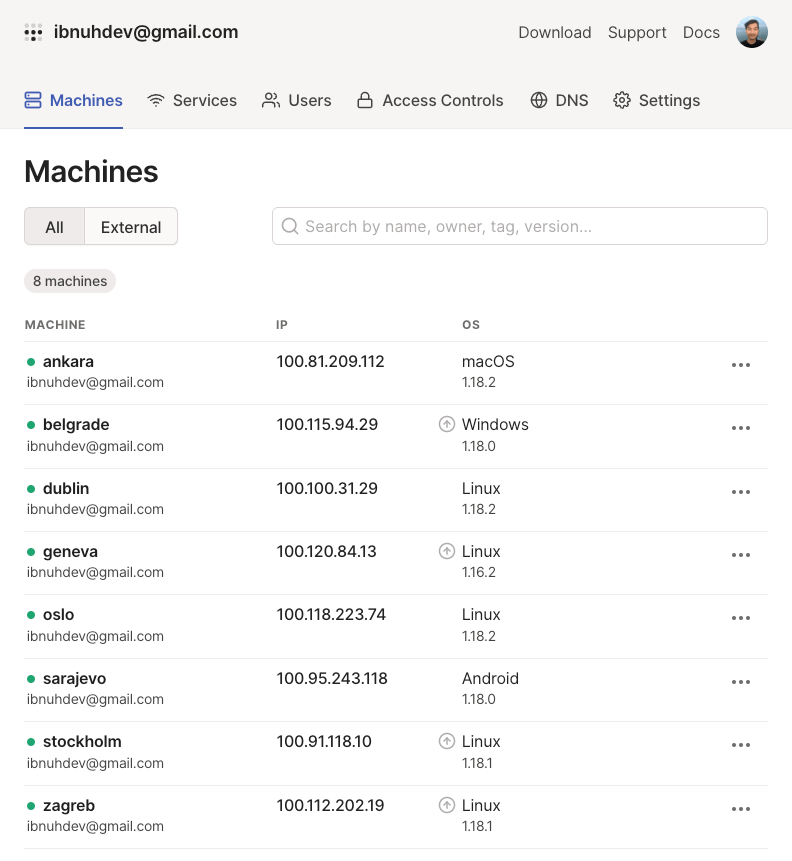
I keep a small personal network tying development machines, a local Linux box, an HTPC, a remote VPS, and a Proxmox hypervisor together.
This write-up is for personal and light use. A company network with heavy policy needs will want something with more knobs. For my home lab, Tailscale beat the OpenVPN path I used before.
OpenVPN era
For a long time OpenVPN was the default personal pick. Spin up a small VPS, stand up a server, spend a weekend wiring clients, then enjoy the mesh until something breaks.
It works. It also keeps asking for maintenance.
Spinning up a whole Linux box
I would rather not babysit another internet-facing box. Hardening, updates, and “is this still patched” checks all eat weekends.
You also pay rent on that VPS. A small instance from Linode, DigitalOcean, or Vultr sat around $3 to $5 a month when I wrote this. Tailscale removed that bill for my use case.
Adding devices was busywork
Even with Pritunl or a web UI in the mix, adding a device meant create user, export config, move the file, import it, then hope. Fine once. Annoying on the fifth laptop or phone.
Debugging was slow
When connectivity died I ended up in logs: config mistake, host issue, or something nastier on the path. Fine if you enjoy that. I wanted less of it for a personal network.
Tailscale
Their site calls it a secure network that just works: install on a device in minutes, firewall rules handled, works from anywhere. That matched what I got after a short trial.
I also like that someone else runs the control plane. Self-hosting is fine until 11pm and nobody is around to help. With Tailscale the coordination lives on their side.
Setup is short: install the client, sign in with Google or GitHub, done. No extra VPN password file to lose. The device appears on the network and can talk to the others. Access control lists are there if you want tighter rules later.
OpenVPN usually funnels traffic through a concentrator. Tailscale builds a peer-to-peer mesh so devices can talk directly when the path allows. Under the hood it uses WireGuard with a fixed, strong default crypto set. You do not get a buffet of cipher menus, which is fine for me.
Getting started
Sign up at tailscale.com with Google, Microsoft, or another supported login. Download the client for the machines you care about. They cover Linux, Windows, macOS, iOS, and Android.
Repeat on each device. Every node gets a stable 100.x.y.z address that works at home, at a cafe, or behind a firewall. For personal gear that was enough to retire my OpenVPN box.
I wrote a longer follow-up after living with a multi-site mesh for years: Tailscale five years later.