Symlink: fix Google Drive sync ugly path on Windows
Google Drive on Windows likes to invent a virtual disk, then drop your files one level deeper under My Drive. That is extra clicking for people who only keep one Drive account and just want a normal folder.
The fake disk also clutters Explorer. I do not need a whole drive letter that only points at one or two folders. I fixed it with symlinks on Windows 11. Sync kept working after the change.
Changes
| After | Before #1 | Before #2 |
|---|---|---|
| E:\Drive | G:\My Drive | E:\Google\ibnuhdev@gmail.com\My Drive |
| E:\DriveRedacted | H:\My Drive | E:\Google\ibnuh@REDACTED.com\My Drive |
| E:\DriveRedacted-Shared | H:\Shared drives | E:\Google\ibnuh@REDACTED.com\Shared drives |
Disable the virtual drive
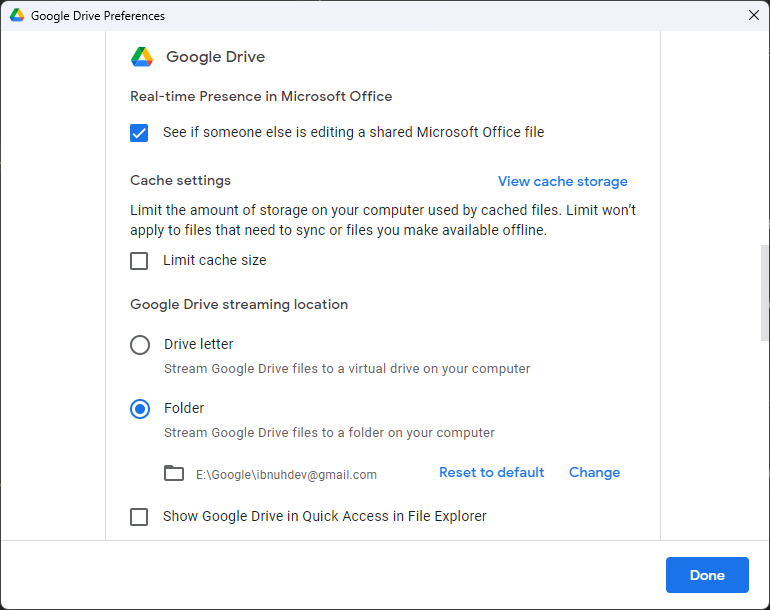
Open Google Drive Preferences, pick a normal folder path for the files, and turn off the virtual drive layout. I append the account email under E:\Google\.... That gives the Before #2 shape and removes Before #1.
You can stop there. I still hated the extra My Drive hop, so I added links on top.
Adding symlinks
A symlink is a filesystem pointer. Programs treat it like a real path more often than a plain shortcut does.
- Open PowerShell as administrator.
- Create the link with
New-Item.
New-Item -ItemType SymbolicLink -Path E:\Drive -target "E:\Google\ibnuhdev@gmail.com\My Drive"More accounts means more links:
New-Item -ItemType SymbolicLink -Path E:\DriveRedacted -target "E:\Google\ibnuh@REDACTED.com\My Drive"After that I open E:\Drive like any other folder. Sync still runs, and Explorer lost the junk drive letters.