How my homelab is wired: Proxmox, Tailscale, and Nginx Proxy Manager
I run a small lab across more than one house: a dense Singapore stack, a couple of Indonesia nodes, and laptops or phones that need a simple way in.
Guests live on Proxmox, sites talk over Tailscale, and browser apps go through Nginx Proxy Manager with normal hostnames and TLS. I have broken pieces of this layout in ways that taught me more than the happy path.
For the mesh-only story, see Tailscale five years later. Here I walk the fuller stack.
The shape
I think in three Proxmox sites:
- prague - main Singapore lab. Media (*arr, Plex, Jellyfin), Home Assistant, tools, DNS, monitoring helpers, and a few always-on VMs I rely on.
- homeland - Indonesia. Smaller box, bulk disk, Docker VM for heavier apps, reverse proxy for that site.
- berlin - second Indonesia node on its own LAN segment, with its own Proxmox guests and a subnet route into the tailnet.
Home edges are GL.iNet Beryl AX units. They handle Wi-Fi, sit behind the ISP box (double NAT), and often advertise the home LAN into Tailscale.
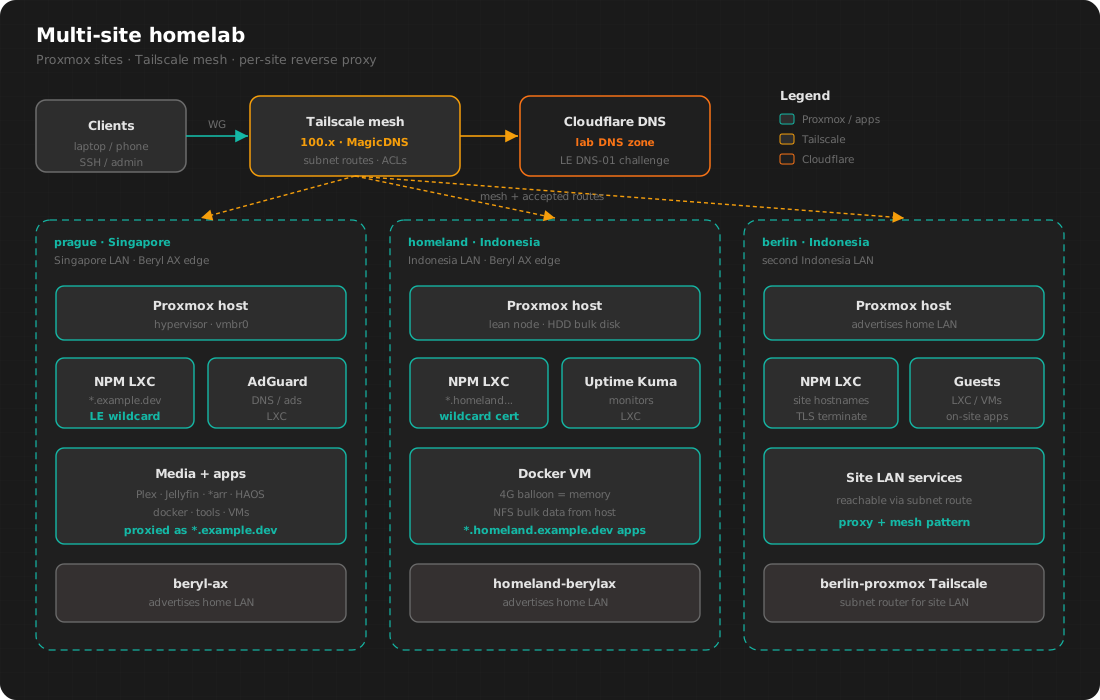
prague carries most of the day-to-day services. homeland stays thinner on purpose and keeps bulk disk local. berlin is another Indonesia footprint with its own LAN range advertised into the mesh.
Why Proxmox
I used to run almost everything on one Docker host. That got awkward once I wanted snapshots, mixed OS needs, device passthrough, or a reboot that only hit one noisy app.
Proxmox covers those cases for me:
- LXC for small always-on services (Nginx Proxy Manager, AdGuard, Uptime Kuma, many of the *arr boxes)
- VMs when I want a full kernel, a Docker-heavy stack, GPU passthrough, or something that fights containers
- One UI and CLI (
qm/pct) across sites
How I choose:
- LXC if the app is one service and the host kernel is fine.
- A VM if the app is a stack, needs devices, or I want to delete it without touching neighbors.
- Memory floors I mean. On one Docker VM I set balloon equal to the memory I actually want. Leaving balloon free to collapse under load made the guest too small when things got busy.
Storage stays simple: root on SSD when I can, bulk data on a spinning disk on the host, exported over NFS into the guest that needs it. Bad Tailscale routing hurts that NFS path first, and I cover that later in the table 52 section.
Tailscale between sites
I still install Tailscale the simple way: client on the box, log in, stable 100.x address. MagicDNS names beat memorizing numbers.
Subnet routes are the bigger change. Each site has its own private LAN range. Those ranges get advertised into the tailnet (usually from the edge router or the Proxmox host), approved in the admin console, and allowed in ACLs. From cellular I can reach a LAN-only admin port or a service that only listens on the home range, without a second VPN profile.
I keep two features apart in my head.
Node to node is path selection between Tailscale clients: direct WireGuard when it works, relay when it must. I still trust that path for SSH and day-to-day access.
Subnet routes are different. A node advertises a home range. Clients that accept routes install those destinations so traffic to a home LAN address can enter the mesh toward the advertiser. The client does not first ask whether it already sits on that LAN.
Linux needs tailscale set --accept-routes. Phones and desktops often accept by default. I have wasted time on bugs that only showed up on Linux servers for that reason.
What has to be true for a subnet route
A range works end to end when all of this is in place:
- A node advertises the route, and IP forwarding is on if that node routes for others.
- The route is approved in the Tailscale admin UI.
- ACLs allow the destination. A missing destination rule for the LAN range can look like broken routing.
- The client that needs the range accepts routes.
Miss one and SSH feels random. The mesh details live in the five years later post. In the lab, the sharp edge is a box that both lives on an advertised LAN and accepts that same range.
When table 52 steals the LAN
On Linux, accepted subnet routes go into table 52. Policy rules check that table before the normal one. Tailscale does this so coffee-shop Wi-Fi that reuses your private numbers cannot quietly win.
On a lab server you trust, the same priority can pull local traffic into the mesh. On homeland I have seen:
- Nginx Proxy Manager return 502 while the upstream answered fine on the real LAN
- NFS hang hard, with the Docker guest stuck and
dockercommands freezing - Ping to a same-LAN host show a hop count that only fits a mesh path
My lasting fix is plain. A small script pins my own site prefix back onto the physical interface inside table 52. A minutely timer runs it. Cron backs the timer up. After a Tailscale reconnect I want the pin back without waiting for me to notice.
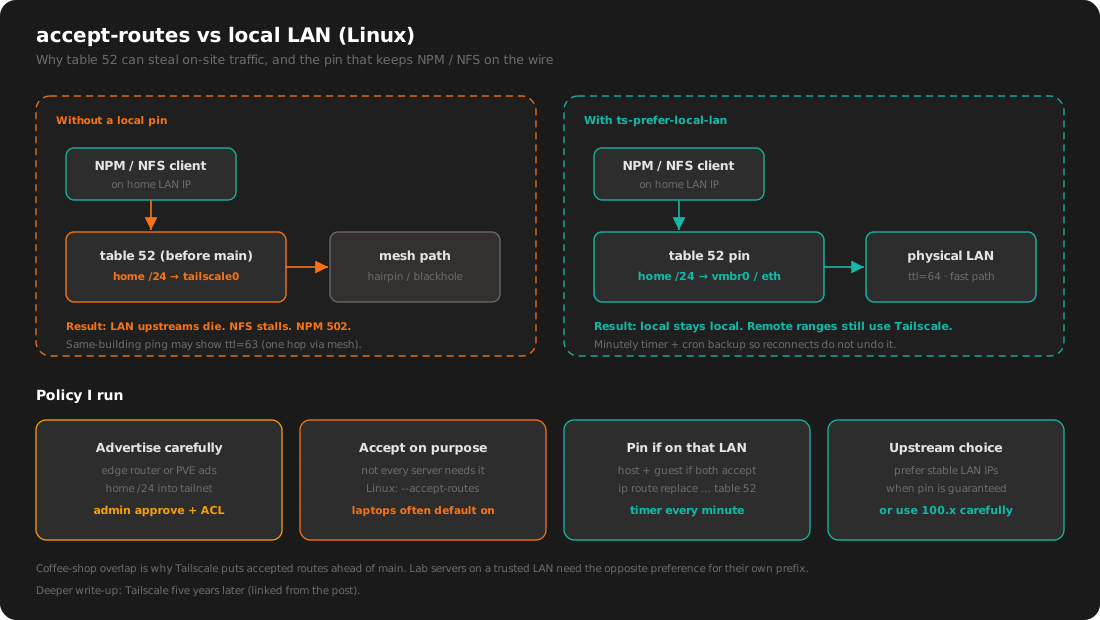
On homeland the pin runs on the Proxmox host and on the Docker guest. The host pin keeps NFS return traffic on the wire. The guest pin keeps the VM’s own LAN calls on the wire while accept-routes stays on.
Plenty of servers only need other nodes’ 100.x addresses, so they never accept routes. When a node must accept routes and also sits on an advertised LAN, I install the pin the same day.
Nginx Proxy Manager in front
I used to SSH-tunnel random ports and bookmark Tailscale IPs with odd ports. On a phone that gets old fast.
Current pattern:
- The service listens on the LAN (or localhost) on the lab node.
- Nginx Proxy Manager runs as an LXC on that site.
- A DNS name points at an address I can reach over Tailscale, or over LAN when I am home.
- NPM terminates HTTPS and proxies to the upstream.
prague uses a short apex-style pattern (*.ibnuh.dev). homeland uses a site suffix (*.homeland.ibnuh.dev) so that site’s names stay grouped. berlin follows the same idea with its own hostnames on that site’s proxy.
I picked NPM because I can click through it when I am tired, and I can still read the nginx files on disk when something looks wrong. Under the hood it is SQLite plus generated config. I install it from the usual community Proxmox helper scripts and keep it on its own LXC so a bad proxy host stays isolated from the rest of the guests.
Wildcard SSL through Cloudflare
I want browser-trusted certs, and I do not want to open port 80 on the home router to the whole internet for every renewal. NPM talks to Let’s Encrypt with a DNS challenge against Cloudflare.
Steps I use:
- In NPM, request a certificate with DNS challenge enabled.
- Provider is Cloudflare, with a DNS-edit token scoped to the zone I use for lab names.
- Let’s Encrypt checks the
_acme-challengeTXT record. - NPM stores a wildcard for that site pattern.
- New proxy hosts on that pattern reuse the cert. Renewals stay inside NPM.
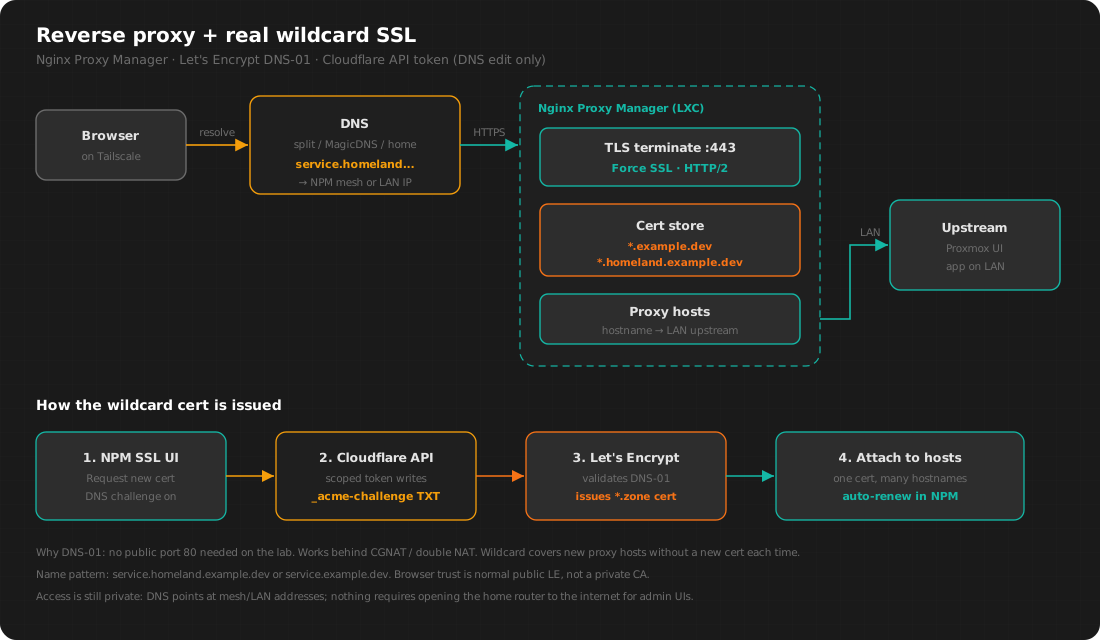
A wildcard covers new hostnames without another HTTP-01 dance from a box that is not publicly reachable. Phones trust the cert the normal way. Issuance still works behind CGNAT or double NAT because nothing has to accept inbound 80 from the internet for the challenge.
Where the names resolve is a separate choice. Some records only matter on the tailnet or on home DNS. The leaf cert is still a normal public Let’s Encrypt cert. Having TLS and being reachable are two different decisions.
Following one request
Here is Plex on prague while my laptop is on Tailscale:
- Browser opens a
*.ibnuh.devname aimed at prague NPM. - DNS returns an address that reaches that NPM over the mesh, or over LAN when I am home.
- TLS finishes on NPM with the wildcard cert.
- NPM proxies to Plex on the site LAN.
- Plex answers; the response rides back through NPM.
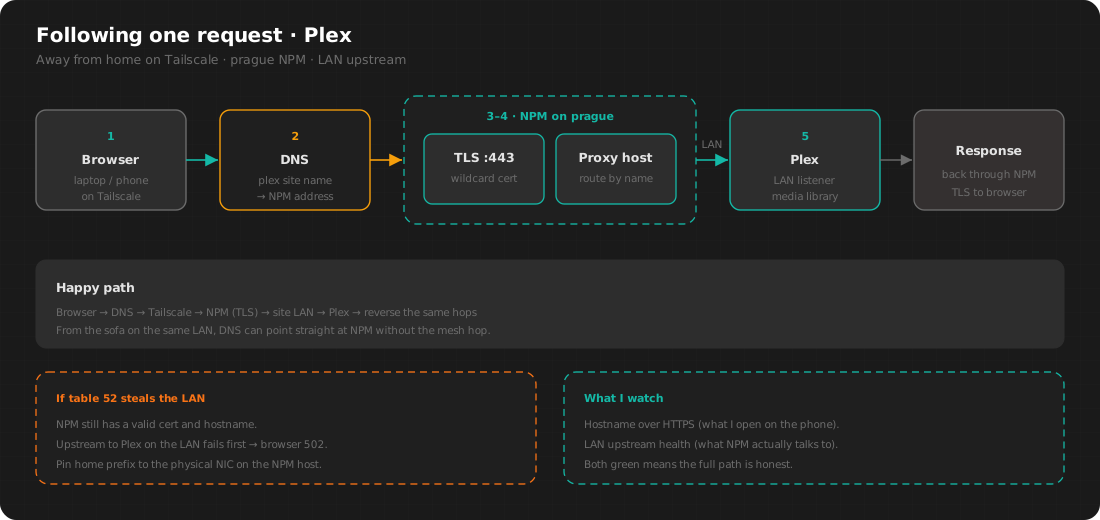
If table 52 has pulled the home LAN prefix onto Tailscale on the NPM host, step 4 fails first. The TLS hostname can still look fine in the browser bar. I monitor the hostname and the LAN upstream for that reason.
What runs where
prague holds the dense stack: media automation, players, Home Assistant, utility LXCs, and a couple of always-on VMs. NPM there fronts most of the short *.ibnuh.dev names.
homeland stays small: NPM, monitoring, one Docker VM, host HDD for bulk data.
berlin is the other Indonesia Proxmox node: its own guests, its own LAN, and the same proxy-plus-mesh pattern when I want services reachable from the tailnet.
Monitoring watches a few LAN upstreams and the hostnames I open most, so a 502 shows up before I go hunting by hand.
Habits I stick to
- Write down which machine advertises which LAN range, and which machines accept routes.
- Install the local-LAN pin the same day accept-routes goes on for a server that lives on that LAN.
- Prefer LXC for proxies and DNS. Prefer VMs for Docker stacks and GPU work.
- Point NPM at stable upstreams. With the pin in place, LAN IPs stay fast on site.
- Write ACLs before advertising a home subnet.
- Avoid giving two sites the same private range and hoping routes sort the collision.
- Keep backups. Rebuilding NPM config from memory costs more than disk.
Choices I kept
- Proxmox as the host OS for machines that should stick around
- Tailscale as the remote-access plane between sites and phones
- Per-site NPM with Cloudflare DNS-01 wildcards
- Site-specific hostname patterns so cert and proxy blast radius stay scoped
- A written pin and timer for accept-routes on Linux lab nodes that sit on an advertised LAN
Choices I dropped after pain
- accept-routes turned on everywhere by habit
- Critical NFS with no plan for a flipped route
- Balloon memory without a floor equal to what the guest needs
- Opening home router ports for admin UIs when the mesh already reaches NPM
- Using the mesh as the only path for bulk on-site traffic like NFS
Closing
I still tweak this lab when something breaks or a site grows. Guests stay on Proxmox, remote access stays on Tailscale, and browser entrypoints stay on NPM with Cloudflare-issued wildcards.
I spend more time keeping routes, pins, and upstreams aligned than shopping for new apps. When that bookkeeping is current, traffic takes the path I expect.
Related: Easily build your own network with Tailscale · Tailscale five years later